
How do I merge my courses?
If you are teaching more than 3 or more sections of a course, you may wish to merge those sections into one course shell to more efficiently manage course content, communication with students, track grades, etc. This request can be accomplished, but it must be done before the start of the semester.
How do you request the section merge?
When you request a section merge, please provide the answers to the following questions:
- What is the CourseID and the sections for the merge? For example, if you are teaching or managing NURS 203 sections 001-008, we need to know there are 8 sections that must be merged.
- Which existing course shell has the most accurate content? In the NURS 203 example, we need to know which previous course has the "master" content. After the sections are merged, Academic Computing will export and import the content into the parent shell for you.
What will happen next?
 Academic Computing will create a new course shell for you with the section code 000 -- for example, NURS201-000-Sprg2014. This will replace all of your other NURS203 courses. The students will still see a link that suggests their respective, separate section numbers, but it’s actually taking them to the 000 master course. You, the instructor, will have full control over the content, communication, assessment, etc. of the master course shell — once we import the content, it should look just like the previous section(s) when they were managed separately.
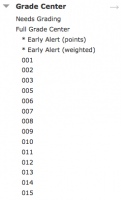
When you go to your grade book, you’ll notice there’s a column called Child Course — this is the filter you can use to sort the different sections. You’ll only need one grade book to manage all of your students! Academic Computing will set up smart views so you can quickly get to those students from the control panel. This will help when it’s time to enter grades in general, or when you need to sort data for entering it into PeopleSoft at midterms and finals.
After the section merge, Academic Computing will ask you to review the parent course shell to make sure the content imported correctly. All student enrollments will proceed automatically as per the usual process.
Section merge requests made after students have submitted assignments or completed assessments cannot be completed.